Design & AI Workflow
AI doesn't say no to you: What Is CLAUDE.md — And Why We Started Taking It Seriously
By Entify design team
·
5 min read
·
6/6/2026
If you're building with Claude Code, there's a moment that catches almost everyone off guard. The tool is fast, responsive, and relentlessly helpful. You ask for a feature, it builds it. You ask for another, it builds that too. And somewhere in that frictionless loop, you stop thinking about what you haven't asked for.
We learned this the hard way while developing Lull, our ambient music app. The lesson led us to CLAUDE.md — and changed how we think about working with AI on real projects.
What CLAUDE.md Actually Is
It's where you tell the tool what it can't figure out from the code alone
CLAUDE.md is a file that lives in your project directory. Claude Code reads it automatically at the start of every session. Whatever you put there becomes part of Claude's working context — no need to re-explain constraints, decisions, or preferences each time you open a new chat.
Think of it less like a configuration file and more like a briefing document. It's where you tell the tool what it can't figure out from the code alone: why a decision was made, what limits exist, what's already been tried.
Most people start using it to capture preferences — things like "always use TypeScript" or "never use this library." That's useful. But we'd argue the more valuable use is capturing things you learned the hard way.
The Crash That Started This
While updating the sound effects in Lull, the audio started producing faint click noises. They accumulated. The longer the session ran, the worse it got. Eventually the clicks were too frequent to ignore.
We started debugging with Claude. We went through the Web Audio node chain systematically — suspecting timing issues, memory leaks, sample rate conflicts. We disabled effects one by one, ran longer sessions, watched the symptoms shift without disappearing. Some changes helped a little. Some did nothing. Hours passed.
The eventual diagnosis: too many Web Audio nodes had accumulated over time, pushing the CPU past the point where it could reliably process the audio thread. The result was missed deadlines in the audio pipeline — which the user hears as clicks.
The fix was reducing overlap counts and lowering the node ceiling. That part took about twenty minutes once we knew what we were looking for.
Where the Real Problem Was
AI didn't know there was a ceiling, because we hadn't told it there was one.
Here's the thing. The bug was real, but the root cause was a pattern, not a line of code.
Over the weeks of development, we had kept asking Claude to add new sound effects. It did, every time, without hesitation. We never asked whether the additions were sustainable. Claude never flagged a concern because it had no reason to — it didn't know there was a ceiling, because we hadn't told it there was one.
AI makes it easy to skip the moment of pause you'd naturally have when talking to a human collaborator.
AI doesn't say no to you by default. It executes. That quality is what makes it fast and useful. It's also what makes it easy to accumulate technical debt, performance issues, or inconsistent decisions across a project — if you're not building in the constraints yourself.
As a designer rather than an engineer, I should probably have thought about performance limits earlier. But the honest observation is that the frictionless nature of working with AI makes it easy to skip the moment of pause you'd naturally have when talking to a human collaborator.
What We Added to CLAUDE.md
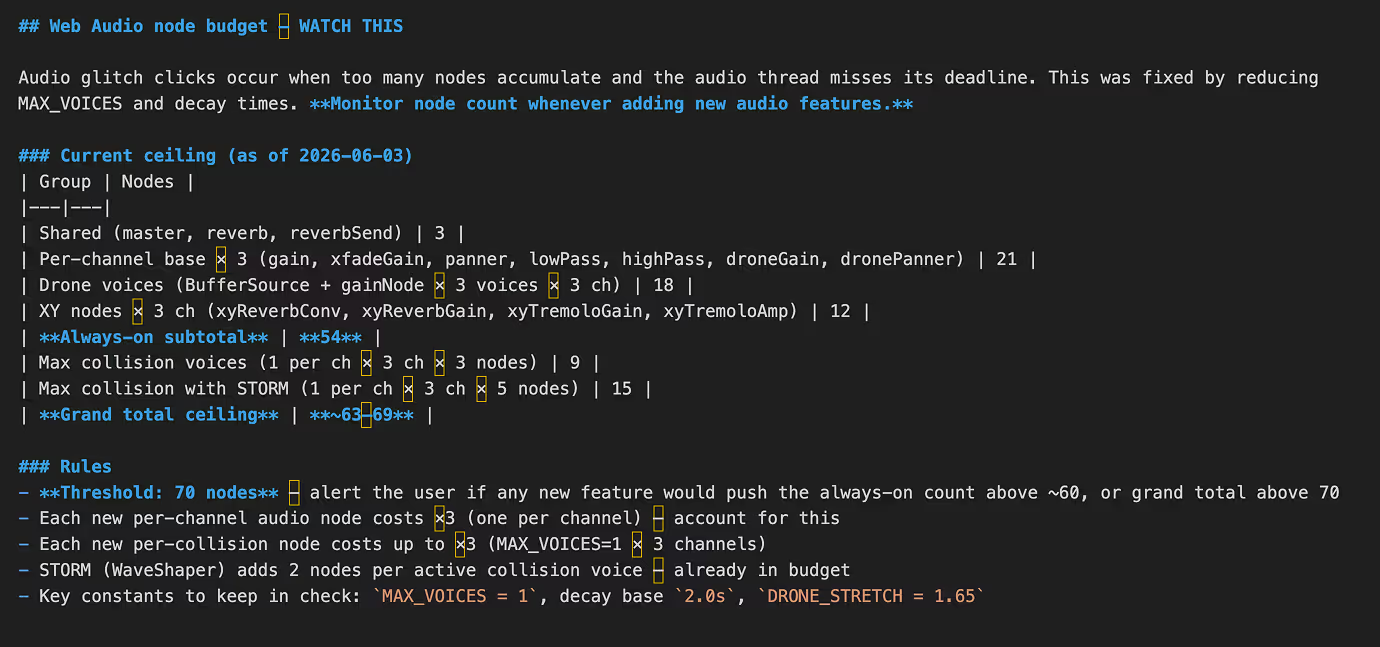
After fixing the issue, we asked Claude to document the current Web Audio node budget directly in CLAUDE.md. Every node group, its current count, and a hard threshold. It now reads something like: if any new feature would push the always-on node count above ~60, or the grand total above 70, flag it before proceeding.
The effect was immediate. The next time we explored adding a new audio feature, Claude opened with a note about the current node count and where the proposed addition would land relative to the budget. We didn't have to remember to ask. The constraint was already there.
That's the shift CLAUDE.md enables: from reactive (fixing problems after they appear) to proactive (the tool checks your constraints before generating new code).
What to Try in Your Own Projects
You don't need to be building an audio app for this to be relevant. Here are three ways to put CLAUDE.md to work:
Document the limits you've already hit. If something broke — performance, scope, consistency — write the constraint into CLAUDE.md so the tool knows about it next time. Frame it as a rule, not just a note: "Alert me if X exceeds Y."
Capture decisions and their reasons. "We chose this library because..." or "We moved away from that approach after..." Without this context, Claude will suggest alternatives you've already ruled out. With it, the suggestions get sharper.
Use it for non-technical constraints too. If you're using Claude for writing, client communication, or design decisions, CLAUDE.md (or an equivalent prompt file) can hold the same kind of guardrails. Tone preferences, things that are off-limits, specific client context — these are all fair game.
An Honest Reflection
We're less likely to make the same mistake twice
We're still refining ours. What's in Lull's CLAUDE.md right now is a combination of hard technical limits, reminders of what we tried before it worked, and a few notes that exist purely because we learned them the slow way.
It won't prevent every mistake. But it does mean we're less likely to make the same one twice — which, across a project that keeps growing, starts to matter a lot.
How do you use CLAUDE.md? We're all still figuring this out together — share what you've found worth documenting. See more of our work and writing at entifydesign.com/our-works.